What's new

Every release of every app, newest first. Follow them all with the feed (RSS / Atom).

October 2026

Mixtapev0.22.0

Cyber, faster, Encore OS

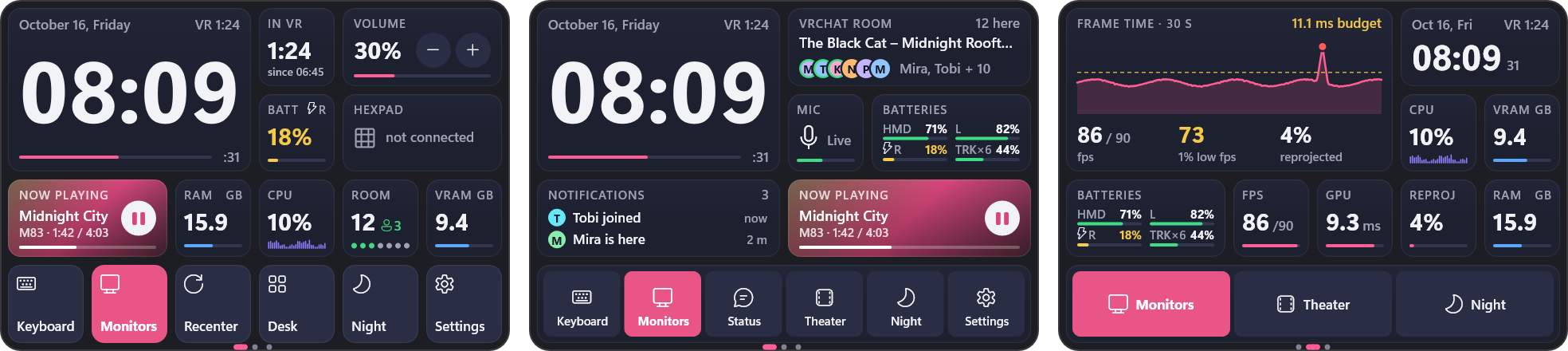
A third look in Settings › Appearance › Look, next to Modern and Windows 95: a sci-fi HUD. Near-black panels on a faint grid, corners cut instead of rounded, yellow caption tags, cyan for whatever is on or playing, condensed type.

  • Starts about twice as fast. The finished Home page is up in about half a second, covers right after it. The iPod is now read in the background, so a slow iPod no longer…
  • Clicks answer in 12–30 ms. Switching pages (Songs used to take ~200 ms to react), hovering over the sidebar and scrolling the song list all do far less work. Page…
  • Fixed: sidebar rows could jump, or leave stripes and highlights behind, when the pointer moved over them quickly.
Release notes
  • The watch comes into view without a hitch: the volume and the microphone are read in the background (a call to Windows' audio took up to 14 ms of its first frame).
  • The volume mixer works in the background: in VR it no longer held OrbitOverlay up for ~9 ms every second or two.
  • The laser's mouse and the keyboard's keys go to Windows on a thread of their own: an app hooked into the mouse that answers slowly no longer holds the overlay up (4-10…
Release notes
  • New watch widgets: Photo (your newest VRChat photos), Weather, Folder (widgets grouped behind one card), Friends online and Session recap (from VRCX), On this day (a…
  • The editor's widget list has categories and a search (type in the desktop window).
  • Gaze focus (Desktops > "Focus the monitor you look at"): the monitor you look at is full size, the others tuck in small beside it - a row of three is a lot narrower. It…
Release notes
Fluxv1.5

A redesign and temperature alerts

Flux now has the same window design as Prisma and Mixtape, and it can warn you about GPU temperature and hot-spot temperature as well as VRAM. Just replace your old Flux.exe; your settings and leak log carry over.

  • A title strip with a hero card. The headline reading sits at the top in its own card: how much VRAM is in use, the percentage, the GPU and process count, the session…
  • The VRAM card shows the trend. The big number moved up into the hero card, so the card below no longer repeats it. It now shows the last two minutes, with a tick…
  • Metrics in a rail. The left column lost its separate boxes. Thin dividers separate the sections instead, and each section still jumps to its process view when you click…
Release notes
  • The Notifications widget opens into a big view like the others: the last notifications, newest first, with where they came from and when; the stick scrolls, Clear…
  • Cyber: the opened clock is a real HUD (the yellow time card, the dial, the date, the day so far, time in VR, a timer), and so are Now playing, the frame rate and the…
  • Theater mode: the dimming goes all the way round you and fades out softly above and below - no edge to see. In Cyber it is a night city: a neon horizon, a synthwave…
Release notes
Prismav2.1.0

Redesigned main window

  • The old header is gone: a borderless title strip is the window caption now — the logo (About), the power button, a "now lighting" card (what the lights are doing…
  • The body is two cards: a rail with your devices and profiles, and one page with Effects, Color, the live preview and Tuning.
  • Every effect has its own small picture, shown on the effect tiles, on each device (what that device really runs) and on each profile.
Release notes
  • Settings > General > Language: English or Magyar, in every style.
  • The Windows volume works in VR: with Virtual Desktop the apps follow the Windows slider, the volume keys and Hexpad's knob, each keeping its own balance (Wrist >…
  • A new Volume mixer widget: the apps playing, each with its own slider and a tap on its icon to mute; opened, it is the whole mixer (in the retro styles the Windows 95…
Release notes
VR Galleryv2.16.2

Years and Months, fixed

Browsing by year and month works properly again: going back to Days after Years shows your photos, not the year cards.

  • Years and Months: the year cards no longer stay on screen under the Days button, the timeline rail no longer runs into an error at these levels, and the rail and the…
  • Update check: asks the project's current GitHub address (the account was renamed).
  • For screenshots: tools/make_demo.py, which builds the made-up library behind the README and website pictures, now also hides who took each photo, never invents a name…
Release notes
  • The Style list in the Windows 7, Classic Mac and Terminal settings now offers Cyber too (it had six styles there).
Release notes
  • Five new styles in Settings > Look > Style, besides Modern and Windows 95: Windows XP, Windows 7, Classic Mac, Terminal and Cyber. Each one draws the watch, the…
  • Windows XP: Luna windows, Tahoma, green progress blocks; opened widgets become Date and Time Properties, Task Manager and Windows Media Player; notifications are tray…
  • Windows 7: glass windows, the Control Panel look, the On-Screen Keyboard and the Windows 7 Minesweeper.
Release notes
Hexpadv2.0.0

The first release under the Hexpad name (it was AjazzDock 1.0.0).

  • Knob HUD: turning a knob shows a Hi-Fi style level display on the keys (volume and more).
  • VRChat OSC: keys and live faces that talk to VRChat (mute, avatar parameters).
  • Monitors off / on key.
Release notes
VR Galleryv2.16.1

Home and a Windows 95 look

VR Gallery opens on a new Home page and can wear a Windows 95 look; everything since 2.0.0 in one release.

  • Home: opens on this evening, this day in earlier years and the worlds you have been to lately, and knows when you are in VRChat.
  • Where you are, in the title bar: while VRChat runs, a pill says which world you are in, for how long and how many photos so far; afterwards, where you were last.
  • Windows 95 look (Settings > Appearance): grey 3D panels, a navy caption, the navigation as a folder tree, Microsoft Sans Serif.
Release notes
  • Hexpad's keys and knobs on the watch now move as smoothly as Hexpad sends them, instead of a few times a second.
Release notes
  • The VRChat room widget opens right on the watch: tap it and it grows into the list of who is in the world, your friends, how long you have been there and who left…
  • The Hexpad widget opens on the watch too: tap it and it grows into the whole dock - keys to press, knobs to drag and the page you are on.
Release notes
  • The watch's volume now works with Virtual Desktop's speakers. That device ignores Windows' own volume (the Windows slider does nothing there either), so the watch sets…
  • The Microphone widget works with Virtual Desktop's microphone.
Release notes
  • Watch pages: your custom face can have several pages - swipe sideways with the laser or tap the dots at the bottom (Windows 95 style: page buttons along the bottom).…
  • New widgets: Microphone (tap to mute), Notifications (the last ones you got), Button group, and Minesweeper - a small tile that grows into the game when you tap it (in…
  • Clock designs: Flip, Outline, Stacked, Segment and Words clocks; Squircle, Classic, Minimal, Roman and Swiss station analog clocks; a new 1 x 1 analog clock like the…
Release notes
  • Each widget on the watch can have its own design: Tint, Solid, Two-tone, Header, Outline or Glass, or the normal card.
  • Pick a colour for each widget: Auto or one of 13 colours. Two-tone also takes a second colour, or makes a matching one for you.
  • In the watch layout editor, select a widget to see the Style and Colour choices with small previews. "Use on all widgets" copies the look to the whole face.
Release notes
  • The first start after updating to 1.10.0 stopped with an error while switching your colours to Bento. Fixed; your settings were not changed by it.
  • The "What's new" window also lists what 1.10.0 brought (the new Bento look), since that version never got to show it.
Release notes

The watch is redesigned (Modern style; the Windows 95 style is unchanged):

  • Dark navy cards, small uppercase captions, and big bold numbers with their units.
  • A pink accent, and clear colours for state (green ok, yellow look, red act) and for data (purple CPU, blue memory).
  • Buttons on the watch carry their names, and a switched-on button is filled with the accent.
Release notes
  • While you hold the trigger on a screen, that screen keeps your laser even past its edge. The cursor stays on the edge, so dragging a window to the very top of a monitor…
  • The other hand can no longer take the mouse in the middle of a drag. Before, the mouse jumped to the other laser when the dragging one went past the edge or held still.
Release notes
  • After an update, a "What's new" window lists what changed since your old version.
  • In VR it appears in front of you. You can grab it and scroll it with the stick.
  • On the desktop it appears over the settings window.
Release notes
  • The watch's volume widget controlled the Windows default device for the "multimedia" role, and only looked for a new one every 5 seconds. When Virtual Desktop made…
  • It now follows the same default device the Windows volume icon uses, checks it every second and switches at once.
  • The log names the device it controls, and says so if a device refuses or ignores a new level.
Release notes
  • OrbitOverlay used to update once per game frame. Measured with VRChat on a 90 Hz headset, that was 63-83 times a second, while SteamVR presented 75-85 frames. Whenever…
  • It now runs on its own high-resolution clock at the headset's refresh rate (measured: 90 ticks/s, 0.23 ms spread). Every frame SteamVR shows, reprojected ones included…
  • It no longer pauses for ~35 ms when SteamVR doesn't signal a frame in time.
Release notes
  • Point at the lower part of a monitor or mirrored window and a bar appears under it. It has a Theater button and theater mode's settings: Dim (how dark the world gets)…
  • In theater mode the bar under the big screen has the same settings, which apply live. You can still switch monitors and exit from there.
  • The same settings are under Settings > Layouts > Theater mode. You can also turn the bar off there.
Release notes
  • The big screen always goes in front of the middle of your monitors, whichever one plays.
  • The middle monitor grows out of its place. One off to the side fades in where the big screen is, with a slight zoom, and fades out there when you leave; it no longer…
  • Switching monitors is a real cross-fade: the new one fades in over the old one, which stays solid underneath until it is covered, so the world no longer shows through…
Release notes
  • Theater mode: the screen shows up where your monitors are. 1.8.0 put it where you were looking when you tapped the button, which is always the watch. Lying back with…
  • The dim behind the theater screen is now a wall just behind the screen, bent around you. Before, it was a sheet right in front of your eyes, which SteamVR could draw…
  • The watch animates at your headset's refresh rate (it was capped at 45 fps).
Release notes
  • A new Theater watch button: the monitor or window you used last becomes one big curved screen in front of you (2.8 m wide at 2.5 m by default). The other panels and the…
  • Grab it to move it, the stick or both hands to size it; it stays curved around you at any distance.
  • Point at the screen and a switcher shows up under it: one button per monitor and mirrored window to swap what plays (they cross-fade in place), and Exit.
Release notes

The cursor no longer jumps to the centre. With 'Keep clicks from the game' on, the game got its input back every time the laser crossed a panel edge, the gap between two panels or the edge of a key, and VRChat moves its cursor to the centre each time that happens. Now the input stays with…

Release notes

Orbit is now OrbitOverlay. Same app, new name. Updating from 1.6 moves your install over by itself: Orbit.exe becomes OrbitOverlay.exe, and the shortcuts and the admin task follow. Your settings stay where they were.

Release notes

Orbit 1.6.0

Your stream dock in VR. If you use an Ajazz AKP03 stream dock with the Hexpad app, Orbit can now show it as a panel you place over the real one on your desk:

  • the six keys exactly as they look right now: pages, folders, live tiles, the idle screen;
  • the round buttons, and the three knobs with what they do.
Release notes

Orbit 1.5.2

Plain lines instead of rings. In the Modern style every value - batteries, frame rate, reprojection, GPU time, VRAM, CPU, memory, volume, the timer - is now a big number over a plain line in your accent colour. Batteries are rows (name, percentage, line); a single device or a 1x1 widget shows one…

  • Widgets no longer pop in again after a lot of editing.
  • Nothing is cut off or glued to an edge any more (Windows 95 timer buttons, timer 2x2, stopwatch, Mute, the 95 status bar, long dates).
  • Bigger numbers; a draggable volume slider on the 3x1 volume widget.
Release notes

Everything fits

Fix: nothing sticks out of a widget any more. The opened player's buttons fit (the next button was cut off), rings and gauges keep their dot inside the card, battery percentages and the timer ring have a margin, and the layout editor's buttons have room around their names. Every widget at every…

Release notes

Your own watch face

New: a custom watch face of widgets. Settings > Wrist > Watch face: Custom, then Edit layout.

  • Put widgets anywhere on a 6 x 4 grid: time, date, calendar, analog clock, timer, stopwatch, time in VR, batteries, now playing, volume, performance gauges, frame graph…
  • Tap a widget to open it big, with more to see and to control: cover, controls and volume; every battery; the month; timer presets; lap times; the frame graph with…
  • Modern style: values drawn as orbits in your accent colour, widgets cascade in when you look at the watch, open with a spring, digits roll. Windows 95 style: little 95…
Custom watch faceRelease notes

Windows 95 style

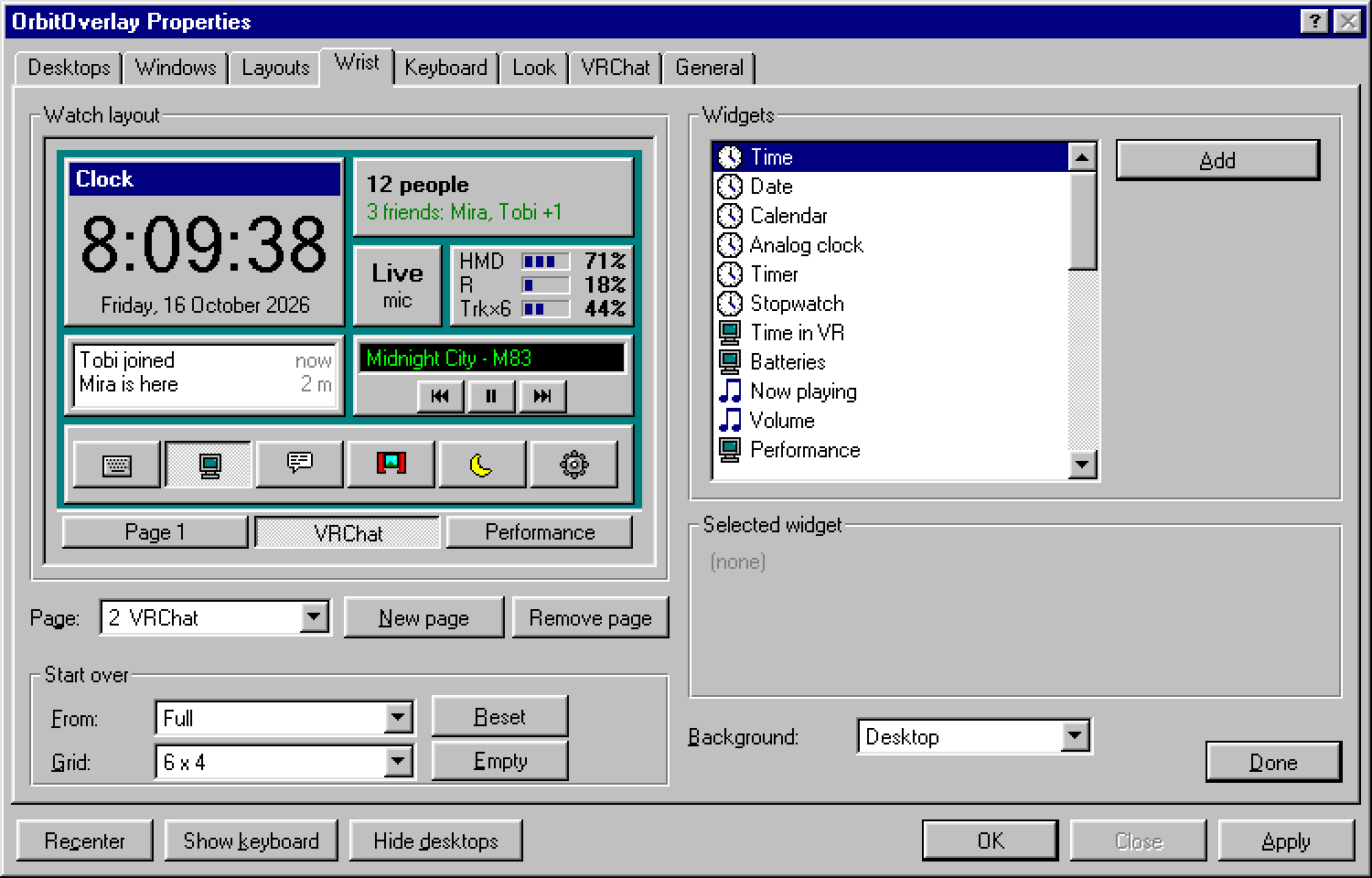
New: an optional Windows 95 style. Settings > Look > Style: Modern (default, as before) or Windows 95. It switches instantly and can be switched back the same way.

  • Orbit Properties: a real property sheet - tabs, group boxes, drop-down lists, trackbars, access keys, OK / Close / Apply. On the desktop the settings window is the 95…
  • The watch is a Date/Time window: big time with seconds, the long date, an analog dial with bevelled teal hands, a CD Player row for what's playing, battery bars, a…
  • The keyboard gets 95 push buttons, notifications become little 95 message windows.
Windows 95 styleRelease notes

Settings stay private

  • Opening Orbit's settings panel no longer counts as "an overlay is open" for VRChat avatar parameters. Avatar add-ons such as DXOverlay now react only to real overlays …
Release notes

A watch that stays put

  • Wrist > Lock position: the grip no longer moves or resizes the watch, so you can't nudge it by accident while grabbing something else. Gripping a locked watch gives a…
Release notes

Says hello after an update

If you're on 1.3.0, open Settings > General, press Check for updates, then Update to 1.3.1. Orbit downloads this release, checks it, installs it over itself and starts again - your settings and shortcuts stay as they are.

  • After an update Orbit tells you so: a card in VR (Orbit updated - now running 1.3.1, was 1.3.0) and updated from 1.3.0 under the version in Settings > General.
Release notes

Your desktop in orbit

Orbit is a lightweight SteamVR overlay for Windows: a watch on your wrist, your monitors - or single app windows - as curved screens around you with a laser mouse, a full VR keyboard, and a settings panel you can grab in VR.

  • Wrist watch with four faces (full, analog, minimal, time only), batteries, frame timing as numbers or a live graph, and now playing with media buttons.
  • Desktop in VR - every monitor as a panel, joined into one curved screen at first start. Grab, move, bend, resize with both hands, snap panels into rows.
  • Single windows - mirror just a browser, Discord or a video player. They follow the window on your PC, and a click brings it to the front first.
Release notes
Mixtapev0.21.0

Something hidden

The first iPods hid a game. Windows 95 hid its credits. This version of Mixtape hides a few things of its own — they're not in any menu, and these notes won't tell you where they are.

  • Settings › About now shows the Mixtape icon next to the version.
Release notes
Mixtapev0.20.0

Lyrics on the iPod

Click-wheel iPods (Classic, nano, 5G) can show a song's lyrics while it plays — press the centre button. Mixtape now puts them there.

  • While adding songs, lyrics you already have on this PC go onto the iPod with the song: a .lrc file beside it, lyrics Mixtape has shown you before, or lyrics already in…
  • For songs already on the iPod, the iPod's page has a new Add lyrics… button. Songs without lyrics are looked up — in the public LRCLIB database too, when Online lyrics…
  • Only the copies on the iPod change. Your own music files on the PC are never touched.
Release notes

September 2026

Mixtapev0.19.0

A Windows 95 look, Listening page, PC play counts

The headline is a whole second look for the app: Windows 95, switchable in Settings › Appearance › Look. Around it, a Listening page, play counts for your own files, and a motion pass for the modern look.

  • The window: navy caption, a menu bar (File · Edit · View · Play · Help), a status bar with a working size grip, the sidebar as an Explorer tree with folder nodes…
  • Pixel icons — 25 of them, 16×16 in the sixteen VGA colours — and optional 256-colour pictures: covers dithered onto the Windows halftone palette, at display time only…
  • Settings as a property sheet with tabs, group boxes, check boxes and the era's Description box; About is a real About box.
Release notes
Prismav2.0.0

Unified Windows RGB control

One app for the motherboard, RAM, GPU, fan strips, keyboard and mouse — driven from a single 25 fps frame loop so everything actually animates in step. No vendor suite, no cloud, no telemetry, no account.

  • OpenRGB SDK over TCP for SMBus motherboard and RAM
  • a native Sapphire Nitro Glow V3 driver over ADL I2C — no OpenRGB, no admin, which is what keeps GPU lighting alive through every boot
  • Logitech HID++ 2.0 direct, no G HUB needed
Release notes
Fluxv1.4

UI refresh + a much faster process list

The process list used to reopen a fresh performance-counter query on every single tick. Measured on ~390 processes, the RAM view went from 36 ms to 6.9 ms per refresh — and because that work ran on the UI thread, that stall is what made the window feel sticky. The GPU counters and the CPU/DISK…

  • Click a metric card to jump to its view — the VRAM, NETWORK, CPU and RAM cards are now shortcuts to their per-process breakdown, with hover feedback.
  • The mode pill slides instead of teleporting.
  • Hot-spot is promoted to the temp card's companion slot with its own thresholds — it is the number that actually throttles the card, and it used to sit in 9px grey while…
Release notes
Mixtapev0.18.0

Deck, Home page, live lyrics, new Cover Flow

The window is reorganised around a deck: the player moved into the top strip — transport, the now-playing card, and the utilities — with the song list below it. The card is one shared drawer, so the detached mini player is literally the same card.

  • Home page — recently added, continue listening, most played, rediscover.
  • Side card on wide windows — Up Next · History · Lyrics, docked beside the list.
  • Live lyrics — a word-timed sheet in the side card, in a popover, or in a full-window stage with the cover's own colours washed behind it.
Release notes

August 2026

VRChronicle is now VR Gallery, with Erik's logo as the app's name and icon.

Release notes
VR Galleryv1.10.2

VRChronicle 1.10.2

1.10.1 raised the frame rate without making a frame cheap enough to hit it, so nothing felt different.

  • Every tile set an antialiased rounded clip path before painting — including tiles whose cached pixmap is already rounded. That drops Qt's raster engine onto its slow…
  • The clip path was built for every tile whether or not anything clipped it. Built on demand: 7.03 ms → ~6 ms.
Release notes
VR Galleryv1.10.1

VRChronicle 1.10.1

Raising the tick rate on its own would not have helped, and would have made the glide shorter rather than smoother: the easing moved a fixed share of the remaining distance per tick, so ticking three times as often simply arrived three times sooner.

  • The frosted header re-grabbed and re-blurred its backdrop on every repaint: 4.03 ms. Cached with a 33 ms life it is 1.05 ms. A backdrop blurred this hard does not read…
  • Every grid tile re-did its rounded clip and re-scaled its thumbnail on every frame. Tiles are pre-rendered per cell size and blitted now: 10.85 ms → 9.33 ms for the…
Release notes
VR Galleryv1.10.0

VRChronicle 1.10.0

A wheel notch moved the scrollbar by a fixed number of pixels in one go, which on a wall of photographs reads as a stutter rather than as scrolling.

Release notes

VRChronicle 1.9.0

A fourth level next to Years / Months / Days: no day headings at all, square tiles with a 2 px gap, sized so the row divides exactly, edge to edge. The library as one object rather than as a run of days.

The continuous viewRelease notes

VRChronicle 1.8.2

The pinned day header looked disproportionate — and it was shaped like the wrong kind of thing.

Release notes

VRChronicle 1.8.1

1.8.0's glass header looked angular and lay across the scrollbar. Both right.

Release notes

VRChronicle 1.8.0

The header buttons could not show photos behind them, because the header sat in a band above the grid — there was nothing behind it. Frosting it there would have been a picture of glass rather than glass.

The frosted headerRelease notes

VRChronicle 1.7.0

No Windows chrome above the app any more. The title bar is built from the same parts as the rest of the UI — minimise, maximise/restore and close, with the app's own hover states and the close button going red rather than grey — and the sidebar now floats on the window as a rounded panel instead…

  • Qt's edge flags are not integers. int() on a combined one raises, so the resize-cursor lookup could never have worked as a dictionary keyed on int(edges).
  • A frameless window maximised to the full screen covers the taskbar. There is now a test asserting the maximised frame stays inside the screen's available geometry — the…
The windowRelease notes

VRChronicle 1.6.1

1.6.0's glass looked angular and lopsided. Both were true, for two separate reasons.

Release notes

VRChronicle 1.6.0

Everything that floats over your photos is now made of glass: the pinned day header, the selection bar, the timeline rail's month bubble and notifications. Each one samples what is underneath, blurs it and tints it, so the panel belongs to the photo it is sitting on instead of covering it up.

Frosted panels over the gridRelease notes

VRChronicle 1.5.0

Zoom the thumbnails from anywhere in the grid instead of reaching for the slider in the header. The row that was at the top of the viewport is put back at the top afterwards, so zooming does not throw away your place — rewrapping the grid otherwise moves everything under you.

Release notes

VRChronicle 1.4.1

Version 1.2.2 grouped the whole library by year on the statistics chart, because the month chart was capped at the last 24 months and older years were falling off it. Grouping was the wrong half of that fix — four bars say a lot less than forty-four.

Release notes

VRChronicle 1.4.0

The Photos page gets a level control. Years and Months are grids of large cover cards: the best photo of that period — a favourite, else the highest rated, else the newest — with the period written across the bottom over a scrim so it reads on a bright sky as well as a night scene.

Release notes

VRChronicle 1.3.1

Two problems with the timeline rail beside the photo grid.

Release notes

VRChronicle 1.3.0

A pass over how the app looks and reads. Every page was reviewed as a screenshot, and these are the things that were actually wrong.

Release notes

VRChronicle 1.2.3

Reported as "with more than four tags on a photo the fifth is always a fixed size — at least sometimes". It was neither intermittent nor about the number of tags.

Release notes

VRChronicle 1.2.1

A tag is now a box you draw around somebody's head, not a single point. Press T and drag; a plain click drops a head-sized box you can redraw later. Tags from the previous version still work — they are read as a centred box.

  • Hovering never actually worked: the image view did not track the mouse, so the name only appeared while a button was held.
  • Every contact sheet crashed. The query behind it did not return the column the export reads.
  • A recording opened from a Moment showed a blank viewer with no way out, and always read as 0 stars.
Release notes

VRChronicle 1.1.0

A gallery for your VRChat screenshots that knows which world each photo was taken in and who was there — because it reads the same logs VRChat throws away.

  • VRCX metadata — if VRCX runs with its screenshot helper, world + players are embedded in the PNG itself.
  • VRChat logs — output_log_*.txt gives a session timeline (Joining wrld_…, OnPlayerJoined/Left, Switching to avatar ), matched against each screenshot's timestamp.
  • Timeline with a month/year rail, search by world / person / file, favorites, albums
Release notes
Mixtapev0.17.0

Get Info tag editor, eject reminder, playlist fix

Full Get Info tag editor, an eject reminder, a fix for playlists showing up twice on Linux, and smoother animations everywhere.

  • Playlists appeared twice on Linux. iTunes mirrors the whole playlist list into two datasets; Mixtape now lists each playlist once (both copies are still written and…
  • The post-write safety check got stronger. The master playlist is now verified at the raw level, so a write that dropped it from only one of the two mirrored copies is…
  • The sidebar eject button now ejects the iPod whose row you clicked, not whichever one is open.
Release notes

July 2026

Fluxv1.3

Per-process DISK / I-O mode

The process panel's selector gains a fifth pill: VRAM · CPU · RAM · NET · DISK. DISK shows each process's real-time I/O throughput (MB/s → GB/s), sorted busiest-first with a mini-bar and the same red ✕ to end a process — the last Task-Manager column Flux was missing. Just replace your old…

  • DISK mode — per-process I/O throughput via the PDH counter \Process(*)\IO Data Bytes/sec, consumed through the existing rate-sampler. Zero-dependency and needs no admin…
  • Aggregates by process name, the ✕ kill path re-validates the live PID and greys out critical processes (e.g. System) exactly like the other views.
  • No admin needed (except the per-process NET view). GPU temperatures use a bundled LibreHardwareMonitor (MPL-2.0) in an isolated worker process.
Release notes
Fluxv1.2.1

Reliability patch

Bug fixes from a full multi-lens audit. No new features — but strongly recommended. Just replace your old Flux.exe; your settings and leak log migrate automatically.

  • No more silent crashes from the temperature reader. GPU temps (LibreHardwareMonitor) now run in an isolated worker process, so a driver-level fault during a sensor…
  • Your settings can't be lost anymore. Config, leak log and snapshots now live in %LOCALAPPDATA%\Flux (writable without admin — an install under Program Files previously…
  • A bad config value can't brick startup. Persisted values are validated and clamped on load — a corrupt or hand-edited value no longer prevents launch or pegs a CPU core.
Release notes
Mixtapev0.16.0

A polish + reliability release for the Linux app, from an adversarial code audit.

  • Reorder playlists — right-click a song in a playlist → Move up / Move down.
  • Delete confirmation — deleting songs from the iPod now asks first (it permanently removes the files).
  • "New playlist… & add" no longer puts your songs in an older playlist that happens to share the name.
Release notes
Mixtapev0.15.0

The Linux app gains real playlist editing and speaks Hungarian.

  • Create a playlist with the + next to PLAYLISTS in the sidebar.
  • Rename or delete a playlist by right-clicking it (deleting keeps the songs in your library).
  • Add songs to a playlist: right-click a selection → Add to playlist (or New playlist… to make one on the spot).
Release notes
Mixtapev0.14.0

The Linux app grows up: it now matches the Windows build's look and gains a full player and Cover Flow.

  • Colour parity — the Linux app now renders the exact same palette as Windows for every theme (Graphite, Midnight, Carbon, Mocha, Forest, Plum). Chips, search field, list…
  • Full player bar — shuffle, previous, play/pause (with a smooth morph), next, and repeat (off / all / one), plus seek, mute, volume, an Up Next queue, and a 10-band…
  • Right-click a song for Play, Play next, or Add to queue.
Release notes
Mixtapev0.13.0

Smart Playlist presets + Linux app leveled up

Smart Playlist presets — a new "New Smart Playlist ▸" submenu with one-click presets: Recently Added · Recently Played · Top Rated · Most Played · Never Played. No dialog — click and it builds the playlist and syncs it to the iPod.

  • No more lost plays on old small-header iPods (early Mini / Nano) — the play-count fold now checks the header can actually hold the value; if not, it keeps your…
  • No more double-counting if the "Play Counts" file can't be deleted after a sync.
  • Stronger post-write verification — the master playlist and structure are now checked, not just the track count, and a failed automatic restore now tells you exactly…
Release notes
Fluxv1.2

Mini task manager

  • Mini task manager. The processes panel gets a VRAM / CPU / RAM / NET selector at the top, so you can rank every process by GPU memory, CPU % (of total), RAM (private…
  • Network card. Total download / upload throughput with a dual-line graph, read off the busiest real interface so VPN / Hyper-V / WSL adapters don't double-count.
  • Per-process network (NET). Like Task Manager's Processes-tab Network column, via an ETW kernel trace. This is the one feature that needs administrator rights — without…
Release notes
Focalv2.1

Sharper capture, new name and icon

PhoneCam is now Focal — same app, new name and a fresh iPhone‑camera‑style icon.

  • Frame‑perfect draw loop. The phone now redraws exactly once per camera frame (via requestVideoFrameCallback) instead of up to 2–4× on 120 Hz ProMotion iPhones — less…
  • Snappier server. The virtual‑camera bridge moved its per‑frame colour conversion off the event loop, so incoming video is serviced with less jitter — most noticeable on…
  • Focal, with a realistic camera‑lens icon. Your saved settings, the trusted certificate on your iPhone, and everything else carry over untouched — only the visible name…
Release notes
Fluxv1.1

A tiny, portable GPU VRAM monitor for Windows. (Formerly VRAMeter.)

  • New identity — Flux. A fresh gradient app icon (violet→pink→orange with flowing "memory in motion" waves) and a matching wave mark in the title bar. Your existing…
  • ~17× faster sampling. The once-a-second background sample no longer snapshots every running process on every tick — it caches process names and only re-reads when the…
  • VRAM at a glance — used vs. real card capacity, % bar, session peak, usage sparkline.
Release notes
Focalv2.0

Left-edge controls, zoom readout, sharper picture

A round-number release: a couple of handy controls plus a small picture-quality bump.

  • Left-edge quick controls. A small cluster (Grid · Mirror · Dim) now lives on the left edge, so in a two-handed landscape grip your left thumb has controls too — the…
  • Zoom readout. While you pinch or drag the zoom, a big glassy zoom number (e.g. 2.4×) appears and fades — the camera-app touch that was missing.
  • The stream now hints to the encoder that it's a mostly-static talking head, so it spends its bits on sharpness rather than smoothing.
Release notes
Focalv1.9

Detail zoom (hi-res sensor-crop)

Adds Detail zoom — sharper zoom that uses more of the sensor.

  • Turn it on in Settings ▸ Camera ▸ Detail zoom. It tells you the actual capture size your phone gave, so you can see whether it helped.
  • It's opt-in on purpose: a high-res capture uses more battery and, on some iPhones, the 4K format runs at 30 fps instead of 60. It's a no-op (no downside) on devices…
Release notes
Focalv1.8

Liquid Glass phone UI

A Liquid Glass makeover for the phone camera page.

  • The tint stays dark enough that white text (lens labels, stats) stays readable over any background — bright scenes included.
  • The blur strength is moderated so it doesn't tax the GPU/battery on long streams (the glass re-blurs the live video behind every control, every frame).
Release notes
Focalv1.7

Phone design polish + camera-blocked recovery card

A phone design polish release — small refinements from a design-focused review of the camera page, plus one real usability fix.

  • "Camera blocked" recovery card. If Safari is blocking the camera (once you've tapped "Don't Allow", it never asks again), you no longer hit a dead-end — a persistent…
  • The framing grid stays visible over bright scenes. It used to fade out against white/bright video — exactly when you need it. It now has a subtle dark outline.
  • Consistency & feel: the zoom slider now matches the same frosted-glass style as the other edge controls; the corner Stop has a softer red edge; lens pills, toggles and…
Release notes
Focalv1.6

Reliability fixes (vcam reconnect, wake-lock, OBS recovery)

A reliability release — nine bugs found by a whole-codebase adversarial audit, all fixed. No feature changes.

  • The virtual camera no longer freezes when the phone reconnects at a different resolution (or you rotate the phone). Previously the webcam was locked to the first…
  • The phone won't sleep mid-stream anymore. iOS drops the screen wake-lock every time you switch apps or pull down Control Center; it's now re-acquired when you return…
  • Dim mode's battery saving actually sticks — a camera recovery behind the black overlay used to silently resume the preview; it now stays paused.
Release notes
Fluxv1.0

VRAMeter 1.0

VRAMeter 1.0 — a tiny, portable GPU VRAM monitor for Windows.

  • VRAM at a glance — used vs. real card capacity, % bar, session peak, usage sparkline.
  • Full telemetry — GPU load + busiest engines, power draw, temperature / hot-spot / VRAM temp, core & memory clocks, fan, plus CPU and RAM.
  • Per-process VRAM — searchable, scrollable list of every process using the GPU, each with a one-click ✕ to end it and free its VRAM (with a live identity re-check so it…
Release notes
Mixtapev0.12.1

Smoother Cover Flow

A patch release focused on one thing: Cover Flow now scrolls smoothly with the mouse wheel, matching how smooth it already was when you grab and drag it.

  • Fast, accumulated wheel jumps skip the expensive mid-angle cover pre-baking (those covers blur past anyway; the resting covers are baked as it settles).
  • The background baker no longer floods the message queue with repaint requests during a glide — the animation already repaints every frame.
Release notes
Focalv1.5

Preview-first PC app (video fills the window, floating controls)

A preview-first PC app — the phone's picture now gets the whole window.

  • The video fills the entire window. The old fixed side panel is gone.
  • Controls float on top as translucent overlays: connection status (top-left), Settings + Fullscreen (top-right), and a Start/Stop button centered at the bottom (red…
  • The QR code, setup steps, virtual-camera selector and tools moved into a Settings panel (gear button, or Ctrl+,). It opens automatically on launch so the QR is right…
Release notes
Focalv1.4

Intuitive phone UI (corner Stop, gesture flip, zoom snap)

A big phone-UI intuitiveness release — the camera page now behaves the way muscle memory expects, and it's much harder to fumble.

  • Stop moved out of harm's way. It's now a small round button in the top-left corner instead of a big red bar under your thumb — so a mounted phone won't get stopped by…
  • Double-tap flips the camera (front ⇄ back), like every camera app. The lens pills still pick a specific back lens.
  • Zoom snaps to the lens marks. Let go near 1× and you land on a clean 1× (no more awkward 0.97× crop), and the matching lens pill lights up live as you drag or pinch.
Release notes
Mixtapev0.12.0

Liquid Glass look

The headline: Mixtape's popups now wear a liquid-glass-style backdrop — an effect crafted to look like Apple's Liquid Glass material. It's not the real thing, just a faithful imitation.

  • Glass-like lensing — a squircle-profile bezel bends the content behind it the way a convex glass edge would (Snell's-law displacement, inward sampling), with a subtle…
  • Live — the Equalizer / Pro / Up Next popups re-render the app behind them in real time: the song list scrolls inside the glass, the player bar's EQ bars keep dancing…
  • Gel-like motion — popups materialize with a damped "settle" wobble instead of a fade, and flex when you press and hold anywhere inside.
Release notes
Focalv1.3

Phone UI polish: session timer, dim mode, toasts

A phone-side UI polish release — the camera page is nicer to look at and easier to live with during long streams.

  • Session timer — the stats badge now shows how long you've been live (8.0Mbps · 12:34), and keeps ticking even while no viewer is connected.
  • Connection health at a glance — the throughput number is coloured green / amber / red based on packet loss and latency.
  • Dim mode 🌙 — a moon button appears while streaming; tap it to black out the screen (great for OLED battery life on long calls). A faint clock shows the elapsed time…
Release notes
Focalv1.2

PhoneCam 1.2

Bug-fix and performance update. Same setup as always — unzip, run PhoneCam.exe (or just replace your existing folder).

  • Lens switches no longer pop. v1.1's seamless switch held the last frame, but applied the new lens's crop to it — so every wide↔tele change visibly jumped out and back…
  • No more frozen viewers from unlucky timing — adjusting zoom/rotation at the exact moment of a lens switch could wire a dead camera track into the stream; the pipeline…
  • "Camera lost — retrying…" — if a phone call steals the camera mid-switch, the page says so and keeps retrying with backoff instead of freezing silently on "LIVE".
Release notes
Focalv1.1

PhoneCam 1.1

Quality-of-life update focused on the iPhone camera page and reliability. Same setup as before — unzip, run PhoneCam.exe. If you're upgrading, just replace your folder (your settings live on the phone/registry, not in the folder).

  • Seamless lens switching while zooming — crossing a lens boundary (e.g. wide → tele) no longer flashes black. The canvas/WebRTC track stays live and only the camera…
  • Telephoto zoom factor setting — iOS Safari can't report a lens's optical zoom, so the tele lens used to be mislabeled "2×". Set your phone's real factor (2× / 2.5× / 3×…
  • Redesigned landscape controls — the 0.5× / 1× / 2× / Front pills now sit in a clean vertical column next to the zoom slider, and the top-right stats/buttons are no…
Release notes
Focalv1.0

PhoneCam 1.0

  • 📱 No phone app — Safari + WebRTC.
  • 🖥️ No OBS, no C++ build required for the core — a small Python relay + an embedded‑browser preview keep the picture smooth at high fps.
  • 🎥 Virtual‑camera bridge feeds the phone's video straight into Discord/Zoom/Teams.
Release notes

June 2026

Hexpadv1.0.0

AjazzDock 1.0.0

AjazzDock is a lean, native controller + system tray for the Ajazz AKP03E "Stream Dock" (6 LCD keys, 3 round buttons, 3 rotary encoders) on Windows. No browser, no web view, no account, no cloud, no telemetry — it talks to the device directly over its vendor HID interface.

  • Render full-color emoji or your own PNG/JPG icons + labels to the 6 LCD keys
  • Bind every input — keys, buttons, encoders (turn ◀/▶ + push) — to actions: open app/file/URL · hotkeys · type text · media · volume · mic mute · page/profile switch ·…
  • Pages and profiles, switchable from a key, button, or the tray
Release notes
Mixtapev0.11.0

A friendly, native manager for classic iPods (no iTunes required).

  • 🌐 Hungarian language support — choose English or Magyar in Settings (restart to apply).
  • ⭐ Rate songs right in the list — click the stars in the Rating column. Ratings and play counts now sync back to your iPod.
  • 🩺 Library Doctor — scan your library and fix missing files, duplicates and stray tracks in a couple of clicks.
Release notes
Mixtapev0.10.0

A small, always-on-top floating player. Click the picture-in-picture button in the title bar to pop it out — the main window steps aside and your music keeps playing. It shows an ambient, art-tinted backdrop, the album cover, a live scrubber, prev / play-pause / next, and volume (slider or…

  • Rounded, modern right-click menus with flush submenus
  • Refined accent-colour swatches in Settings
Release notes
Mixtapev0.9.0

Album art now syncs to the iPod, plus automatic device-ID recovery.

  • Album art on the iPod — when you copy songs to a colour-screen iPod (iPod photo, 5G/video, Classic, and every Nano), Mixtape now writes each track's cover art to the…
  • _Grayscale models (e.g. the iPod mini) have no on-screen artwork — this only applies to colour-screen iPods._
  • Auto device-ID recovery — when a hash58 iPod (Nano 3G/4G, Classic) is plugged in without its hardware ID stored, Mixtape now offers to read it automatically (a safe…
Release notes
Mixtapev0.8.0

A playback update: shuffle & repeat, hardware media keys, and Windows media controls, plus a cleaner UI.

  • Shuffle & repeat — toggles either side of the transport. Repeat cycles off → all → one; shuffle plays a random track forward while Previous steps back through what you…
  • Media keys — your keyboard's / headset's play-pause, next, previous and stop buttons now control Mixtape.
  • Windows media controls (SMTC) — the now-playing track (with cover art) shows in the Windows 10/11 media flyout and on the lock screen, with working…
Release notes
Mixtapev0.7.0

A big update: a refreshed look, a new app icon, an always-on player, local playlists, new themes, and the first Linux build bundled in.

  • Fresh design — a cohesive visual refresh: one consistent corner-radius scale, smoother edges, quiet section labels with a single bright accent, and richer gradients.
  • New app icon — a modern cassette on the signature teal tile (also the in-app logo).
  • Always-visible player — the now-playing bar stays docked and is fully responsive: controls never overlap as the window narrows, with crisp vector transport icons and a…
Release notes
Mixtapelinux-appimage-0.1pre-release

AppImage (preview)

Single-file AppImage — download, make it executable, run. No more extracting a tarball, and VLC is bundled in, so audio works on a Steam Deck / immutable-root system with nothing to install.

  • Preview — back up your iPod and test one song before trusting add/delete on a real device.
  • The older .tar.gz Linux build is still available in the earlier "Linux preview" releases as a fallback.
Release notes
Mixtapev0.6.1
  • 🚫 No accidental duplicates. When you add music or video — by button or by dragging files/folders onto the window — Mixtape now checks what's already on your iPod. If…
Release notes

The first stable release! 🎉 A friendly, standalone manager for classic click-wheel iPods. No iTunes required.

  • 🪄 Drag & drop to add. Drag songs, videos, photos — or whole folders — straight onto the window to copy them onto your iPod. A "Drop to add" card appears while you drag.…
  • Built-in player + 10-band equalizer with a Spotify-style seek bar
  • Local Music — play files from your PC without an iPod plugged in
Release notes
Mixtapev0.5.1pre-release

A small fix on top of v0.5.

  • 🎬 Video lengths now show correctly. Movies and other hour-plus items were displaying their time with the hour dropped (a 1:33:10 video read as "33:10" — "much less than…
Release notes
Mixtapev0.5pre-release

A friendly, standalone manager for classic click-wheel iPods. No iTunes required.

  • 🎚️ Built-in player + 10-band equalizer with a Spotify-style seek bar — play songs from your iPod or your PC.
  • 💻 Local Music — point Mixtape at folders on your PC and browse / play them even with no iPod plugged in.
  • ⭐ Star ratings & play counts read from the iPod's own Play Counts file.
Release notes
Mixtapev0.4pre-release

Manage classic click-wheel iPods on Windows: copy music, videos & photos, make playlists, edit tags, pick cover art, and preview media. No iTunes required.

  • ⭐ Star ratings & ▶ play counts in the song list — see your ratings and how many times you've played each song. Click the column headers to sort by them, and toggle…
  • 🛈 Greyed-out buttons now explain themselves — if Add music (or Add video/photos/Delete) is unavailable, clicking it pops up why it's greyed out and how to fix it (e.g.…
  • 🎨 Accurate per-model iPod colours, ✨ smooth Apple-style animations, and a refreshed app icon.
Release notes
Mixtapev0.3pre-release

Manage classic click-wheel iPods on Windows: copy music, videos & photos, make playlists, edit tags, pick cover art, and preview media. No iTunes required.

  • 🎨 Accurate iPod colours — the device picture now matches your iPod's real colour (e.g. a green mini), resolved from its model number across mini / nano / shuffle…
  • ✨ Apple-style animations — Settings fades + rises open, cover art cross-dissolves, the content area cross-fades when you switch tabs, and toggles / segmented controls /…
  • 🆕 Refreshed app icon — a cleaner, properly centred cassette.
Release notes
Mixtapev0.2pre-release

Manage classic click-wheel iPods on Windows — copy music, videos & photos, make playlists, edit tags, pick cover art, and preview media. No iTunes required.

Release notes